

PowerPoint can help teachers organize information, introduce new concepts, and guide students through a lesson. However, presentations can also become passive. The teacher speaks, the slides change, and only a few students actively participate.
The solution is not necessarily to stop using presentations. Instead, teachers can add moments that require students to think, choose, discuss, and respond.
Here are several practical ways to make PowerPoint lessons more interactive and involve more students.
Begin With a Question
Students are more likely to pay attention when they have something to think about from the beginning.
Instead of opening with a slide full of information, start with a question related to the lesson. It could test prior knowledge, introduce a dilemma, or ask students to make a prediction.
For example:
- What do you think is the most common cause of ocean pollution?
- Which invention has had the greatest influence on everyday life?
- What would you do if you were the main character?
- Which solution do you think will work best?
Do not reveal the answer immediately. Let students choose, explain their ideas, or discuss the question with a partner first.
Give Everyone a Way to Respond
When teachers ask questions aloud, the same confident students often answer first. Other students may need more thinking time or may prefer not to speak in front of the class.
Interactive voting gives every student an opportunity to participate without having to raise a hand.
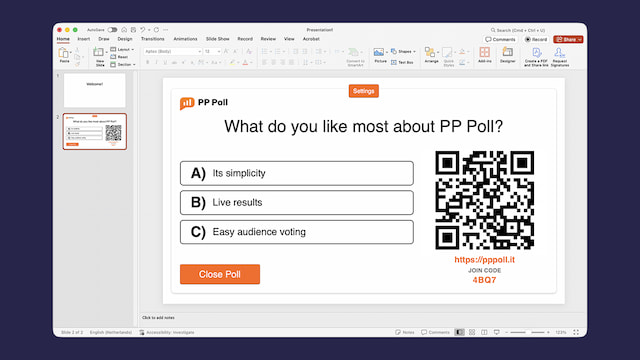
With PP Poll, teachers can add a poll to a PowerPoint slide. Students scan a QR code or open a short voting link on their own device. They do not need to install anything before participating.
Once everyone has voted, the results can be shown inside the presentation.
This approach can be especially helpful when you want to hear from the entire class instead of only the quickest volunteers.

Add Decision Points Throughout the Lesson
Interaction should not be limited to the beginning or end of a presentation. Add small decision points throughout the lesson.
After explaining a concept, ask students to choose the correct example. Before showing a solution, ask which method they would use. Halfway through a story, ask what they think will happen next.
These questions encourage students to process the information instead of simply watching the slides.
A decision point can also determine the direction of the lesson. For example, students could vote on which case study to examine, which example to solve, or which discussion question to explore next.
Use Poll Results to Start Conversations
The result of a poll is not just an answer. It can also be a visual starting point for discussion.
When one answer receives most of the votes, ask why it seemed convincing. When the class is divided, invite students from different sides to explain their reasoning.
Useful follow-up questions include:
- What made you choose that answer?
- Which information influenced your decision?
- Why might someone choose another option?
- Has anyone changed their mind after hearing these explanations?
The aim is not always to reach the correct answer as quickly as possible. In many lessons, the reasoning behind the answers is more valuable than the final result.

Let Students Vote Before Showing the Results
Students can be influenced by what other people choose. If live results are visible while voting is still taking place, some students may follow the most popular answer instead of thinking independently.
For questions that test understanding or ask for an honest opinion, consider revealing the results only after voting has closed.
PP Poll can display results while people are voting or after the poll has been closed. Teachers can choose the approach that best suits the activity.
Showing the results afterwards also creates a clear moment of anticipation, which can help maintain attention.
Include Opinion Questions
Not every classroom poll needs to have a correct answer.
Opinion questions are useful for subjects such as literature, history, citizenship, social studies, and ethics. They allow students to compare perspectives and discover that their classmates may interpret the same information differently.
Examples include:
- Was the character’s decision justified?
- Which historical development had the greatest impact?
- Should this rule be changed?
- Which argument is the most convincing?
Make it clear that students should be prepared to explain their choice. The vote introduces the discussion, but the conversation provides the deeper learning.
Ask Students to Predict
Prediction is a simple way to activate curiosity.
Before showing the result of an experiment, ask students what they think will happen. Before reading a text, let them predict its conclusion. Before presenting statistics, ask them which outcome they expect.
After revealing the answer, compare it with the poll results. Discuss why some predictions were accurate and why others were not.
This method works because students have already committed to an idea. They are more interested in the result because they want to know whether their prediction was correct.
Use Quick Reflection Questions
At the end of a lesson, give students a moment to reflect on their learning.
You might ask:
Which statement best describes how you feel about today’s topic?
- I understand it and can explain it.
- I understand most of it.
- I need more practice.
- I am still confused.
You could also ask which part of the lesson was most useful or which topic they would like to revisit.
These answers can help you plan the next lesson. They also encourage students to think about their own progress.
Keep Participation Simple
Classroom technology is most useful when it supports the lesson without requiring a long explanation.
Students should be able to join an activity quickly. Teachers should not have to open several applications, transfer results manually, or leave the presentation to manage a poll.
PP Poll is a PowerPoint polling add-in that lets teachers create the question, present the voting instructions, and display the results from within PowerPoint.
Because the audience votes through a browser, the activity can work on different types of devices.
Do Not Overuse Interaction
Interaction is effective when it has a clear purpose. Adding a question to every slide can slow down the lesson and make participation feel repetitive.
Choose moments where student input genuinely adds value:
- At the start, to activate prior knowledge.
- After an explanation, to check understanding.
- Before an outcome, to encourage prediction.
- During a debate, to compare opinions.
- At the end, to support reflection.
A few well-placed questions are usually more effective than constant polling.
From Presentation to Participation
PowerPoint lessons do not have to be one-way presentations. By adding questions, predictions, choices, and moments of reflection, teachers can turn students from viewers into participants.
Live polls provide a practical way to involve the whole class and make responses visible. More importantly, they give teachers information they can use immediately.
The technology itself is only a tool. The real value comes from asking meaningful questions and using the answers to guide explanation, discussion, and learning.
